




Remarketing has been a part of the Google AdWords arsenal for some time now, however only some ecommerce marketers use it to their advantage. Remarketing is an effective Pay Per Click (PPC) advertising model that allows ecommerce marketers to serve follow-up ads to past website visitors.
The foundation to remarketing centers on building a targeted list or audience within Google AdWords. The webpages of a site that are most relevant to that list will be infused with a special tracking code. This code enabling Google to drop a cookie in the browser of those who visit that page.
For ecommerce sites, remarketing is a powerful technique to get your brand in front those who have already visited your website. This can serve as the perfect little reminder to get shoppers to re-visit your online store and complete a transaction. However, you’ll want to balance your remarketing efforts carefully and avoid overly-exposing your ads so that visitors don’t feel as if they’re being stalked.

Imagine the ability to show someone the exact pair of shoes they looked at on your site – on several other sites they visit after they’ve left you. From social media sites, video placements, email accounts, etc, all of these remarketing channels can remind your visitor of that awesome pair of shoes they viewed.
Getting Started

To find the remarketing tools in Analytics, click on the “Admin” tab in the upper right-hand corner. Here you’ll see all the options you need start putting together your ecommerce remarketing campaigns. Start by clicking the tab that says “Remarketing Lists.”
In essence, Google Analytics enables you to build target lists for your remarketing campaigns, while syncing them with your AdWords account with the click of a button.
Creating a Remarketing List
Remarketing with Google Analytics is a rather new feature that allows users to seamlessly create a remarketing list based on many specified parameters, such as:
- Visitors who visited a specific page of the site (e.g. homepage, landing page, shopping cart)
- Visitors who spend a certain amount of time on the site
- Visitors who viewed a certain number of pages
- Visitors who completed a conversion goal (e.g. placed items in the shopping cart)
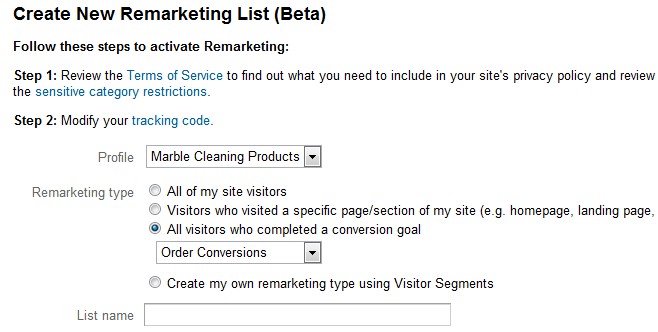
The last remarketing type, based on conversion goal completion, offers endless possibilities in creating highly targeted remarketing lists. Also note there is not an option for ‘visitors who spends X minutes on my website,’ however you can build almost any type of remarketing list based on a specified conversion goal.
Setting conversion goals is pretty straightforward. Once a goal is established, you can implement the goal as your remarketing list parameter under the option ‘All visitors who completed a conversion goal’ (shown above.)
Ongoing Testing & Refinement
Now that we have a sound method to target our audience, we need to ensure the ad copy pairs well with the list segmentation. Keep in mind that this is an ongoing endeavor, and you need to write and split-test various ads. The idea is pinpoint the copy and ad-type that work the best (e.g. text ads versus graphic ads.)
Ecommerce PPC advertisers have a lot of options when using the Google Display Network. Test all that are relevant to see what works the best. Because Analytics is linked to AdWords, Google offers a wealth of data to help you refine your remarketing campaigns.
Sometimes your ads will be displayed on websites that are not a good match for your ecommerce brand. Therefore you should assess the performance of your placements every week or so, and tell Google not show your ads on irrelevant or undesired websites. Common domains that you should immediately remove from your list of placements are Ask.com or Mapquest.com (these are both far too broad to effectively target your audience.)
